This is an old revision of the document!
Table of Contents
DM41X HP16C Module
Keyboard Overlay

Background
The HP16C Programmer's Calculator is made for manipulating numbers in Binary/Octal/Hexadecimal/Decimal to help with programming and other areas that rely on the nitty-gritty of bit-twiddling.
Swiss Micros make a modern hardware emulation (similar in form to the DM15L I already own) but rather than adding another calculator to my (growing) collection I found there is a ROM/Module method to add all (and more) the same features to the DM41X (and presumably the HP41, if you can find a hardware ROM plugin with it).
I occasionally need to do some conversions/calculations into Hex and Binary (thinking of TCP/IP networking, subnet masks etc. or perhaps debugging RS232 serial data, or when writing rig control software?) and being able to do everything on the DM41X (along with the Complex Number module) means the DM41X will become even more useful day-to-day.
The manual for the HP16C Module hp_16c_emulator_manual.pdf
The versions of modules I'm using : hp-16c_rev.1a.zip
The HP16C
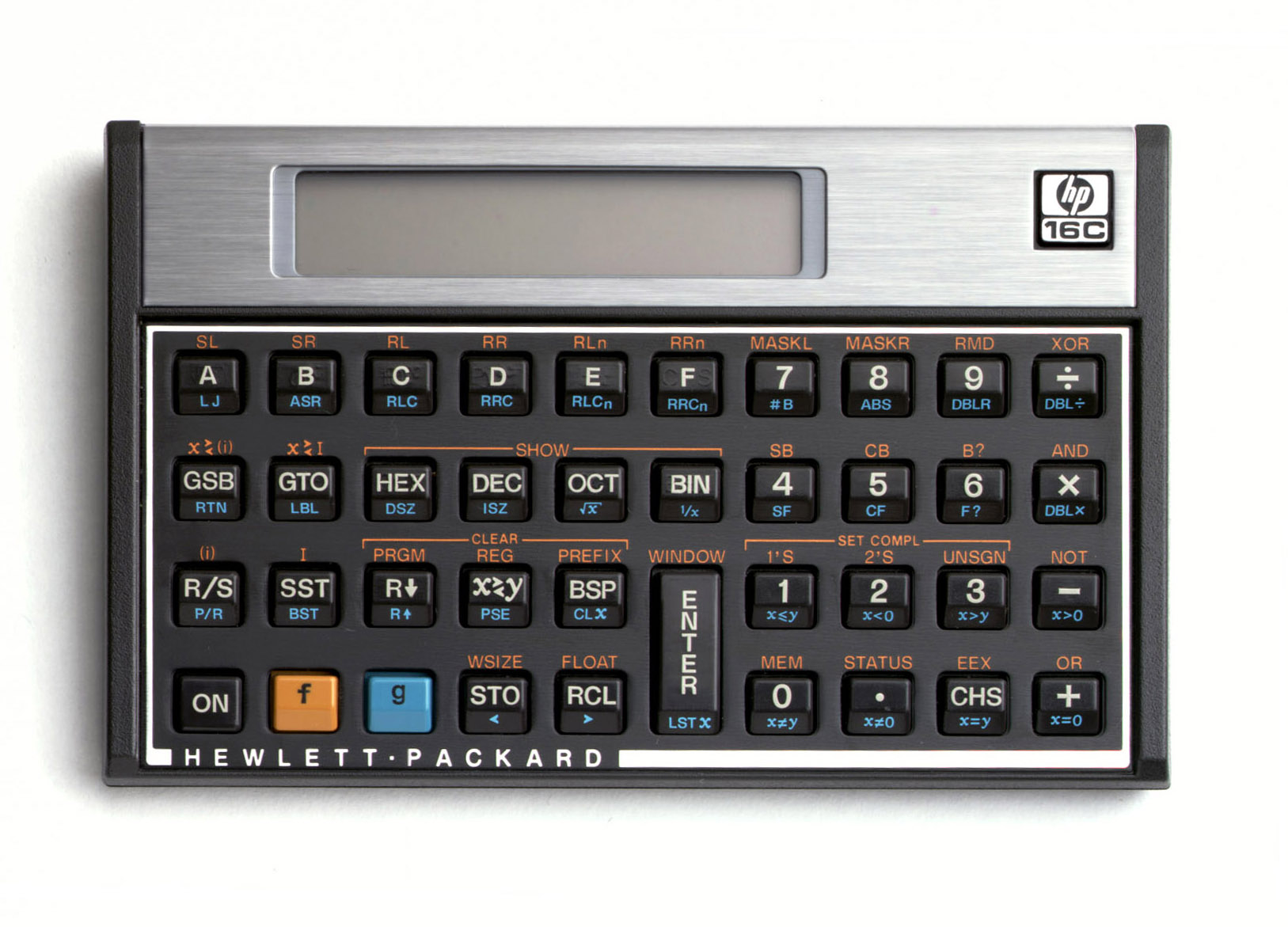
The HP16C Manual : https://literature.hpcalc.org/community/hp16c-oh-en.pdf
The DM16L
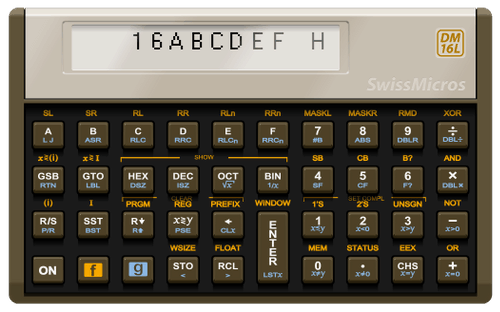
Basic Operation
Like the 41Z Complex Number module, a USER keyboard assignment is made to a trigger command which then automagically re-maps the whole keyboard for one command, then it reverts to normal. A mental image of the re-mapped keyboard starts to develop with use, making operation easier with time.
I've assigned the LN key to the trigger command 16C for the USER keyboard
SHIFT ASN ALPHA SHIFT 1 SHIFT 6 C ALPHA LN
User Keyboard comments
With USER keyboard active I generally won't miss the loss of LN as I rarely use it.
If I do need LN I can simply turn off the USER keyboard.
The same applies for using the ∑+ key for entering Statistical Data - it's assigned to the Complex Keyboard trigger ΣZL.
I won't ever be using statistics at the same time as complex numbers (or HP16C functions).
The USER keyboard can generally remain active all the time except when I want to do statistics or calculate a natural logarithm. Two easy sacrificed keys. Are there others I can do without for additional assignments to frequently used functions or modules?
16KEYS?
Select the Base
USER keyboard active.
16C is USER assigned to LN - referred to as 16C hereafter.
I'll use the alpha letter for the top-row keys to describe them for Base Selection
16C B = BINARY
16C C = OCTAL
16C D = DECIMAL
16C E = HEX
Enter a number
HEX
Enter HEX value 5F
Use the 16NPT function which lives on the Σ+ button (it switches from the complex assigned ΣZL to 16NPT when the 16C is invoked)
16C E (to get into HEX mode)
16C 16NPT 5 F ENTER
Convert to BIN
16C B gives 1011111
Enter a new BIN number
16C 16NPT (i.e. Σ+) 1101100 ENTER
Add them together
16C + gives 11001011
Convert to HEX
16C E gives Cb
Convert to DEC
16C D gives 203
always enter numbers with 16C 16NPT the number ENTER
always use the 16 versions of mathematical functions
16C +
16C X
etc.
NOT, OR, AND, XOR
These are on shifted (and triggered with 16C) math keys:
- = NOT
+ = OR
x = AND
÷ = XOR
Example, in binary….
AND two numbers:
11011101 AND 10001001 →
16C B (to get into Binary mode if needed)
16C 16NPT 11011101 ENTER
16C 16NPT 10001001 ENTER
16C SHIFT X gives 10001001
In HEX…. XOR →
16C E (to get into HEX)
16C 16NPT BEEF ENTER (first number) (make sure at least 16-bit word size for this example Word Size
16C 16NPT CAFE ENTER (second number)
16C SHIFT ÷ (XOR) gives 7411
Convert answer to DEC
16C D gives 29713
Convert answer to BIN
16C B gives a long string of 1 and 0 that scroll across the screen…
Window
View the long BIN number using a WINDOW to look at 8 bits at a time…
16C SHIFT R/S
This asks WINDOW _ and enter 0 for the 1st (MSB) 8 bits:
W0: 11101000:b
Scroll to sequential WINDOW slices with + and - →
+ →
W1: 0010001:b
+ →
W2: :b
The full 16-bit number is therefore:
111010000010001
Setting Word Size and negative number convention
The word size can be up to 64 bits. In general most stuff is 4, 8 or 16 bits wide, so you can set the size of the binary number in the ∑MOD launcher:
16C USR (one of several different ways of getting to ∑MOD)
There is then a choice of settings
B:O:D:H:F - 0: 1:2:W:S:?
The first four can set the mode to Binary, Octal, Decimal, Float.
- 0 sets
UNSIGNEDintegers - 1 sets
ONE'S COMPLEMENT - 2 sets
TWO'S COMPLEMENT
Word size is checked with S
Word size is set with W then enter (eg) 16 to set 16-bit words.
Word Size can also be set directly from a 16C keyboard function 16WSZ accessed via 16C SHIFT 5 rather than via the ∑MOD menu/launcher
? displays the current settings (press ? then quickly press and hold it to read the displayed info)
0c - 16 - DEC
This means unsigned integers, 16-bit words, DECIMAL mode.
Other Launchers
Lots of functions are available in launcher sub-menus, eg a menu of rotate functions, or shift functions.
The various launchers are available cyclically via the 16C XEQ along with SHIFT and A
Some trial and error is needed to find what you want, but it starts:
16C XEQ → R: L LN RN R which is a menu to do bit-rotations.
Rotate 1-bit Left by pressing top-row button B
Rotate N-bits left with top-row button C (and enter the number of bits)
Rotate N-bits Right with top-row button D (and enter the number of bits)
Rotate 1-bit Right with top-row button E.
From the R menu:
A give the S: L LN RN R menu to SHIFT bits Left or Right
From the S menu:
XEQ gives ∑R : …………………. which gives lots of options to do things rightwards with the bits.  list them
This goes on via XEQ and SHIFT (ORANGE button) to access several menu launchers. Trial and Error and muscle memory.
A brief map/list of launchers
assumes 16KEYS is active
XEQ → ∑ROT
∑ROT → XEQ → ∑LEFT → XEQ → ∑MOD → XEQ → ∑ROT
∑ROT → A → ∑SHF
∑SHF → XEQ → ∑RIGHT → XEQ → ∑BIT → XEQ → ∑SHF
∑LEFT ↔ SHIFT ↔ ∑RIGHT
∑MOD ↔ SHIFT ↔ ∑BIT
∑SHF ↔ SHIFT ↔ S“:
∑ROT ↔ SHIFT ↔ RC:
Registers etc
Numbers can be saved in 16C registers via 16C STO NN
e.g. save a subnet mask of 11111100 into REG 00 (a /30 network 255.255.255.252)
16C B (go to BINARY mode)
16C 16NPT 11111100 ENTER 16C STO 00
Use the stored value
What is 123 AND MASK ? (what's the network base number for host address of 123 using a netmask of 252?)
16C D (decimal so you can enter 123 rather than a BINARY number)
16C 16NPT 123 ENTER
recall mask (it doesn't matter that it was initially stored as a BINARY number, it's displayed in whatever base you are currently using)
16C RCL 00
AND them
16C SHIFT x
answer is 120
The MASK is still in 16-Register 00 if needed again….
Net address of a host with address 43?
16C D
16C 16NPT 43 ENTER
16C RCL 00
16C SHIFT X
answer : 40
xxx.xxx.xxx.43 has a network address of xxx.xxx.xxx.40
Most Used Functions
16C = LN (i.e. E on top-row)
16NPT = ∑+ (i.e. A on top-row, must be triggered with 16C) 2)
16C 16NPT type in a number ENTER (enter a number in whatever base is currently selected)
BIN OCT DEC HEX = 16C then one of top-row buttons B, C, D, E (select the required base)
∑MOD = 16C USR …. or 16C SHIFT 2 (open a settings menu to set the choice of mode/word/signed)
NOT / OR / AND / XOR = 16C SHIFT then one of - + x ÷ (logic functions)
RR / RL = 16C then one of SIN or COS (rotate Left or Right 1-bit)
RRN / RLN = 16C SHIFT then one of SIN or COS (rotate Left or Right N-bits)
SLN = 16C TAN (shift Left N-bits)
SRN = 16C SHIFT TAN (shift Right N-bits)
Sb = 16C SHIFT 7 (set a bit _ _)
Cb = 16C SHIFT 8 (clear a bit _ _)
B? = 16C SHIFT 9 (is a bit set or not?)
#BITS = 16C SHIFT ∑+ (i.e. A on top-row) (how many bits are high?)
See Keyboard Overlay Pic above for more hints on 16C key assignments
EVERYTHING STARTS WITH ''16C''
It is recommended to change the assigned key occasionally to prevent wearing it out…..
Page created Fri May 27 21:31:20 2022 by John Pumford-Green
Page last updated: 30/12/25 09:55 GMT
16C is still available on some keys…. e.g.
SHIFT 6 = 16C
so… SHIFT 6 USR → ∑MOD16C and hit ∑+ directly you'll probably end up with the complex number module keyboard triggger Z:

